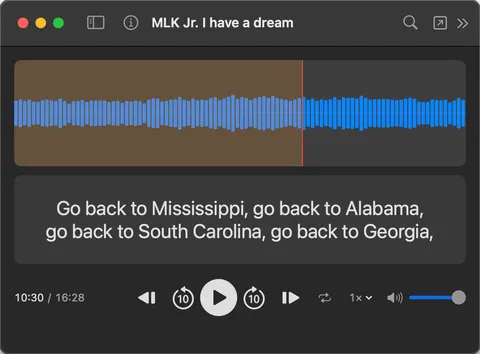
If you’ve ever tried to play an audio file with subtitles, you’ve probably noticed something frustrating: most media players simply don’t support it well.
The Problem
Subtitles aren’t just for video. Language learners listen to podcasts and audiobooks with transcript files. Researchers work with interview recordings and transcriptions. Students review lectures paired with captions. In all of these cases, you have an audio file and a subtitle file, and you just want to see the text as the audio plays.
But most players treat subtitles as a video-only feature. Open an MP3 with an SRT file in a typical media player and you’ll essentially get a blank video with no subtitles, no transcript, and no way to follow along.
What About VLC?
VLC is the go-to recommendation for playing almost anything, and technically it can display subtitles over audio. The catch is that you need to enable audio visualizations first. VLC needs a video surface to render subtitles onto, so without visualizations turned on, your subtitle file is simply ignored.
Even with visualizations enabled, the experience is poor. You get a distracting, constantly moving background with subtitle text overlaid on top. There’s no way to scroll through the transcript, no way to click a line to jump to that moment, and no way to search for a specific word. It’s a workaround, not a solution.
A Better Way
SubSeeker is a subtitle-first media player for Mac that treats audio and video files equally. Drop in an audio file with its matching subtitle file, and SubSeeker displays a waveform with the full transcript in a clean, scrollable panel below it. The current line is highlighted and auto-scrolls as playback advances. Click any line to jump to that timestamp instantly.
You can also search. Type a word or phrase and SubSeeker finds every occurrence across the current file or your entire imported library. If you have a semester of lecture recordings or a backlog of podcast episodes, one search covers all of them.
How to Set It Up
- Get your audio file and its subtitle file. If you don’t have a subtitle file yet, use any transcription tool that outputs SRT, VTT, or LRC. MacWhisper, Whisper, Aiko, or any speech-to-text service will work.
- Put both files in the same folder with the same filename. For example,
podcast-ep12.mp3andpodcast-ep12.srt. - Drag the folder into SubSeeker.
- SubSeeker automatically pairs the audio and subtitle files by matching filenames.
- Click the file in your library and press play.
Your files stay where they are. Nothing gets copied or moved. SubSeeker works with SRT, VTT, LRC, ASS, and SSA subtitle formats and plays common audio formats like MP3, M4A, WAV, and more.
Get SubSeeker
SubSeeker is available on the Mac App Store.